
Appearance
Fix 'Credits Depleted' or Credential Errors When Posting to X with Revive Social
When Revive Social fails to post to X (formerly Twitter), you may see one of two error messages:
- Credits Depleted — X's API has explicitly returned a credits or usage limit error.
- Your Twitter credentials seem to be wrong. Please double check your API Key and API Secret Key. — a generic authentication failure that can appear even when your API keys are correct.
Neither error is caused by a problem with the Revive Social plugin itself. Both can be triggered when your X developer account has run out of API credits, hit a spending cap, or no longer has active access to the required API tier.
In this article
Understanding the Error
Revive Social uses the X API keys you provide in its settings to post on your behalf. X operates a usage-based credit model for API access — each post, read, or API call consumes credits allocated to your developer account. When your account runs out of credits or hits a spending limit, X returns the Credits Depleted error and stops accepting new requests until the limit is increased or the billing cycle resets.
X can also return a generic authentication failure — shown in Revive Social as "Your Twitter credentials seem to be wrong. Please double check your API Key and API Secret Key." — when API access is blocked or inactive due to expired credits, a lapsed billing subscription, or an account that no longer meets the required paid tier. In this situation the API keys themselves are valid and correct, but X rejects them because the underlying account access is no longer active.
📝 Note: Revive Social does not provide, manage, or replenish X API credits. Your X developer account and its billing settings are managed entirely through developer.x.com.
If Revive Social says your Twitter credentials are wrong
If you see the message "Your Twitter credentials seem to be wrong. Please double check your API Key and API Secret Key." in Revive Social, do not immediately regenerate your API keys. The keys may be perfectly valid — the problem is often that your X developer account no longer has active API access.
This message typically appears when:
- Your monthly API credit allocation has been exhausted and X is blocking all API calls.
- Your X developer account billing has lapsed or a payment failed, removing access.
- Your X app is on the free tier and its allowance has run out for the current period.
- Your X developer subscription or paid API tier has expired.
In all of these cases, regenerating the API Key and API Secret Key in the X Developer Portal will not resolve the error. You must restore active API access first, then reconnect the account in Revive Social.
Check whether your X API access is still active
Before making any changes, review your X developer account to identify the exact cause. Work through this checklist:
- Go to developer.x.com and sign in with the X account that owns your developer app.
- In the left navigation, click Apps and select the app connected to Revive Social.
- Click the Usage tab within the app settings.
- Review the Monthly spend and Usage limits sections to see how much of your allocation has been consumed.
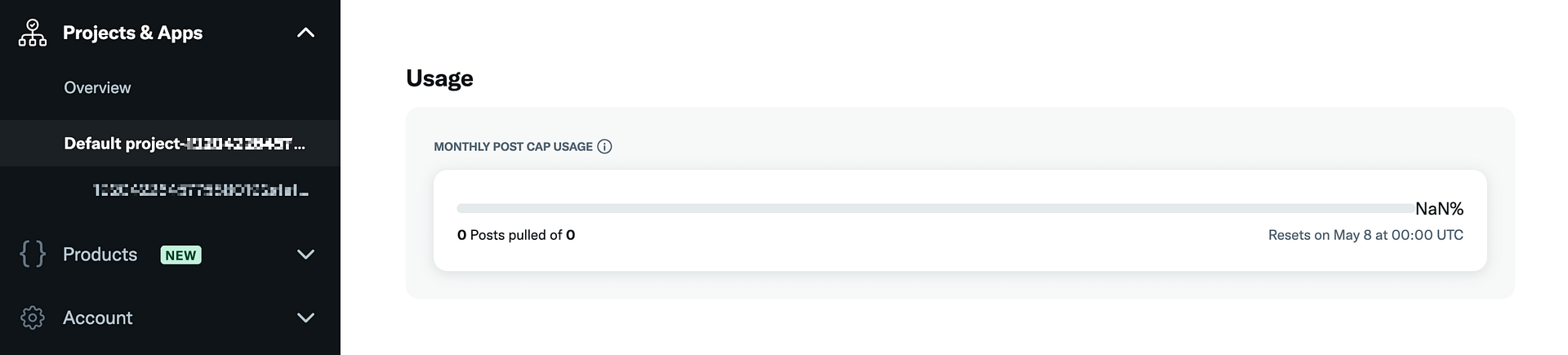
Continue checking the following:
- Spending limit — In the Usage tab, confirm whether a spending cap is set and whether it has been reached.
- Billing status — In your X Developer Portal account settings, verify that your payment method is current and no payments have failed.
- API tier / Products — Visit developer.x.com/en/portal/products to confirm which tier your account is on and whether it is still active.
- Monthly credits — If you are on a plan that includes a monthly credit allowance, check whether the current period's credits are fully consumed.
Resolve the Issue
Depending on what you find in your X developer account, there are a few ways to resolve the error:
Increase your spending limit
If you have a spending cap set on your account:
- In the Usage tab, find the Spending limit section.
- Click Edit and increase the limit to allow more API usage.
- Save your changes. Revive Social will be able to resume posting once the limit is raised.
Purchase additional credits
If your monthly credit allocation is exhausted:
- In your X developer dashboard, navigate to your billing or subscription settings.
- Purchase additional API credits or upgrade to a higher-tier plan that includes more credits.
- Once the credits are available, Revive Social will resume posting automatically.
Upgrade your X API tier
If you consistently hit limits, consider upgrading to a higher X API access tier:
- Visit developer.x.com/en/portal/products to compare available tiers.
- Select a plan that matches your posting volume.
- Complete the upgrade process and update your billing information if required.
💡 Tip: The free X API tier has very low monthly limits. If you use Revive Social to post frequently, a paid tier is recommended to avoid hitting the credits limit.
When regenerating keys will not help
Regenerating the API Key and API Secret Key in the X Developer Portal will not resolve either of these errors if your X API access is inactive. New keys issued to an account with expired credits or a lapsed billing subscription will fail in exactly the same way as the old keys — because X is blocking API calls at the account level, not rejecting a specific key.
Only restore access to X's API first (by purchasing credits, raising your spending limit, or activating a paid tier), and then reconnect the account in Revive Social.
⚠️ Important: If you regenerate your keys before restoring API access, you will also need to re-enter the new keys in Revive Social settings and reconnect the account after access is restored.
If you do not want a paid X API plan
If you prefer not to purchase an X API subscription or credits, you can disable posting to X in Revive Social without affecting your other connected social networks:
- In your WordPress dashboard, go to Revive Social.
- Open the Accounts tab and find your X (Twitter) account.
- Click the toggle or remove the account to disconnect it from Revive Social.
Revive Social will continue sharing to any other connected networks (Facebook, LinkedIn, and so on) without interruption.
Prevention Tips
To avoid the Credits Depleted error in the future:
- Monitor usage regularly — Check the Usage tab in your X developer account at least once a month to stay aware of how many credits have been consumed.
- Set an appropriate spending limit — Configure a spending cap that reflects your typical posting volume rather than using the default or minimum limit.
- Scale your plan with your posting schedule — If you increase the number of accounts, post types, or posting frequency in Revive Social, review your X API plan to ensure it can handle the increased volume.
- Check usage before high-volume periods — Before campaigns or scheduled bursts of posts, verify that you have sufficient credits available.